Weeknote 18: Extrinsic Motivation, Diagramming Software, and AI Special Effects
Extrinsic Motivation · Focusmate · Thinking About Software at Different Complexity Levels · Derek Sivers: Handling Public Criticism · AI Video Effects · Digital Art
Table of contents
Extrinsic motivation
Intrinsic motivation is so 2008; now it’s all about extrinsic motivation.
My new extrinsic motivation tool this week is Focusmate.
All Tools
- Focusmate — where you schedule meetings to work on a task with an accountability buddy.
- Beeminder — where your credit card is charged (more and more money) when you don’t complete your goal.
- Deepworktimer.io — a competitive leaderboard where you track your time deepworking.
All of these have some aspect of public accountability, and one includes financial accountability.
Stats I’m tracking
This week I did:
- 22 hr 31 min of deepwork
- 3 nights of sleep data collected
- 5 workouts
Mapping code design: ERD and Database Rules
I’ve been thinking about my project in terms of levels of planning, high level to low level. At every level, there’s a useful diagram or chart that helps me plan. At a high-level view, there are flowcharts and C4 system context diagrams. This week I focused on a lower level: mapping out the database and its rules.
For my database modeling, I worked on an entity relationship diagram (ERD).
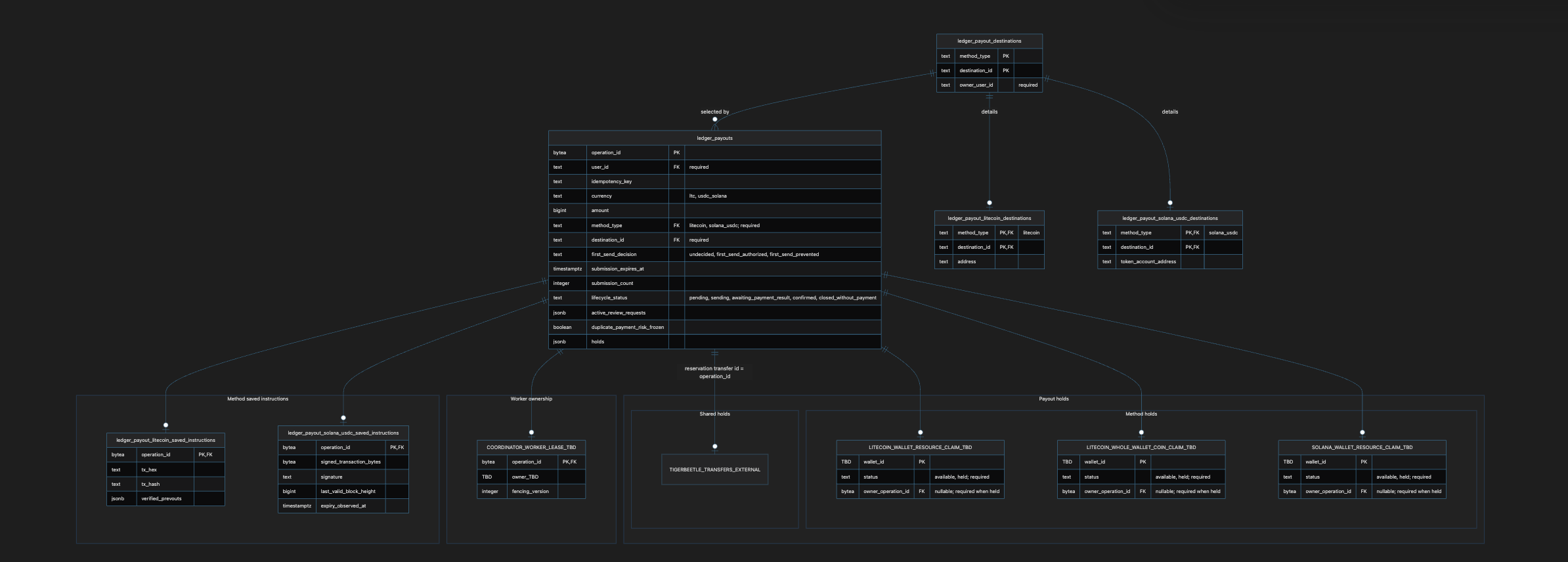
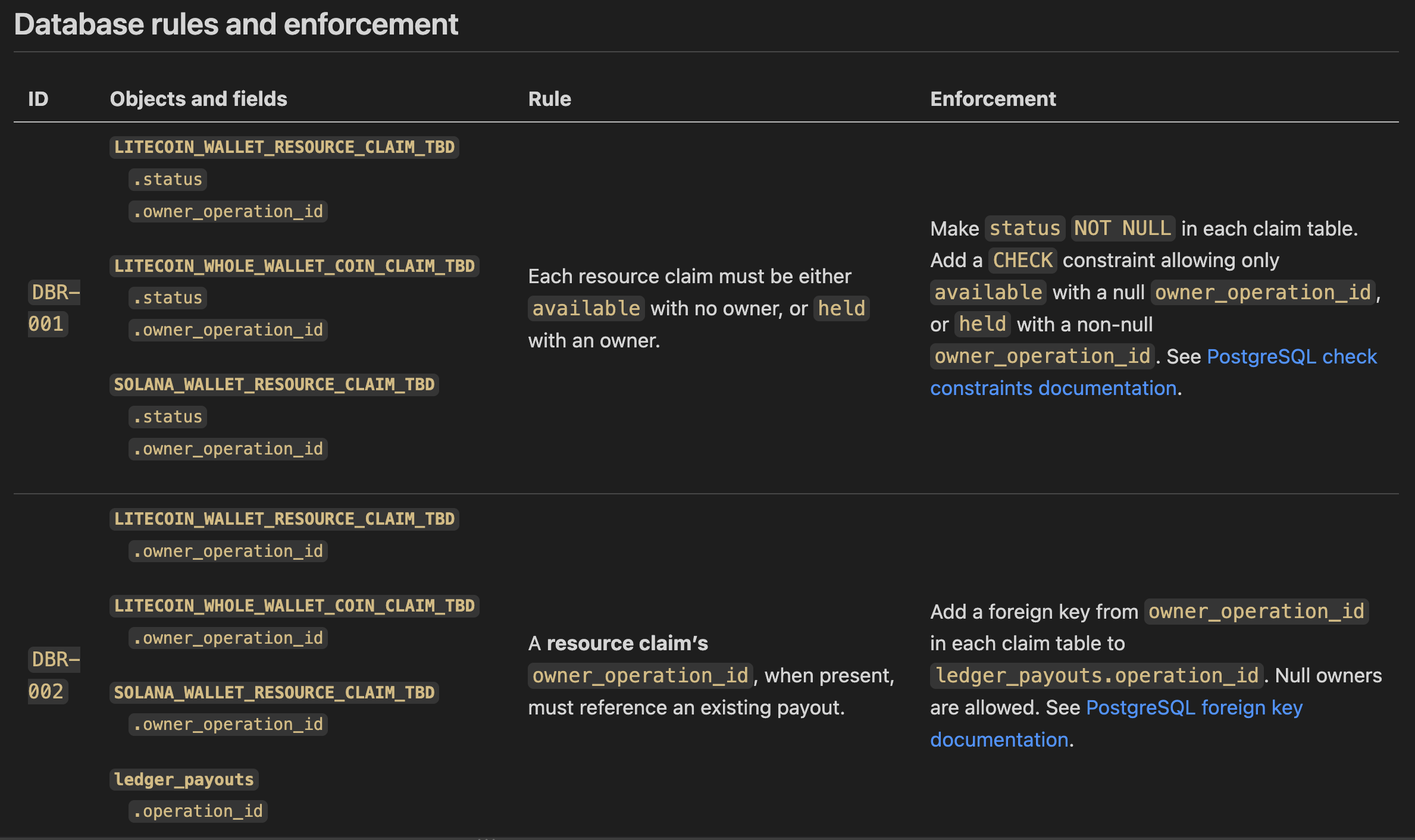
An ERD shows the relationships of database tables, but it can’t show all parts of the relationships. So I also documented the details about the fields in a data dictionary table. I documented additional database rules and their implementations in a database rules and enforcement table.
I’m always changing how I use AI on this project. For this week, I used AI to help me investigate questions and best practices, review my work, and give me starting examples of some diagrams. But I read, reviewed, and edited everything myself. I also spent much of the time simplifying the logic, something I find AI to be bad at.
My use of AI is always evolving, so I made this page a few weeks ago to keep current documentation on how I use AI.
Derek Sivers on Creating in Public and Haters
I’m always looking for ways to combat hate and judgment.
Here are some Derek Sivers quotes I enjoyed this week:
Separate creation and release. When you’ve finished a work, wait a while before you release it to the world. By then, you’re on to something new. The public comments won’t affect you, since they will be about your past work.
Consider creating under a pseudonym. This will help you know that criticism is not about you, just something you made.
Derek Sivers, Create.
They weren’t talking about me. They were talking about a cardboard cutout that looked like me.
Derek Sivers, The public you is not you
AI SFX
I previously thought AI video was mainly limited to video creation. But I watched some tutorials on adding special effects to real footage using AI that really inspired me. In one video, the creator even changed the lighting direction using AI, which would be so useful. It made me want to play around and make some videos.
Tutorials I watched:
- How to Change the Lighting of ANY of Video using AI - Kling vs SwitchX — Ben Kaluza
- I Added Insane AI VFX to Real Footage in 4K (Seedance 2.0) — Higgsfield AI
- I Challenged a Pro VFX Artist to Beat AI — Higgsfield AI
- Can AI Beat VFX? (feat. ErikDoesVFX) — Higgsfield AI
I used to make films as a kid, even winning some middle school and high school film festivals. (Is second place winning?) But I was so limited to what lighting I had available, what sets I could make, the available daylight, and my nonexistent budget. I think it would be cool to make some short videos — Robert Jahns style — where you take a real image and put something surreal but fitting. Here’s a good example:
Ten years ago, I tried to make somewhat similar surreal/dreamy images with Photoshop.
Here are a few of my Photoshop pieces from a decade ago he may have inspired. Not included: I have more direct inspirations from my travels, but they aren’t online as I feel like no one cares to see travel photos.